Here is the link where you could download the latest JDK.
http://java.sun.com/javase/downloads/index.jsp
I have heard about this long awaited release, JDK6u10 since the time I attended the Sun Developers' Day 2008, on June this year. Joey Shen presented what's new in this version.
Though the version name seems to be only minor update to the JDK 6, actually this version contains a whole bunch of improvement.
The most notable one explained by Joey Shen is the modular approach in downloading JRE. Now the JRE could be downloaded very fast, the initial will only be download only small piece of jar. Later other components will be downloaded on demand.
Why jump straight away from update 7 to update 10?
I believe these features weren't released as JDK 7 because JDK 7 has been released to the community as OpenJDK in which Sun Microsystems doesn't have the direct control over the release. There were some long discussion on what features should be in, not mentioning also when to release. Inherent problem with community driven release of such SDK is the delay caused by strong disagreement among the community.
So I guess that Sun just put a certain number for the next version, which turned out to be update 10 while we were in the update 5 or 6 just to be safe and give some lead time to complete the job. As there are lots of full timers and experienced employees working on the version Sun Microsystems could be better drive the release of update 10. Eventually they finished long before update 8 being used, thus the number jumps from update 7 to update 10!
Showing posts with label jdk. Show all posts
Showing posts with label jdk. Show all posts
Tuesday, October 21, 2008


Tuesday, September 23, 2008
On Migration Problem from WebLogic 8.1 to 10.0
Somebody posted a question on an old entry of my blog, asking about the problem they have when migrating from WebLogic 8.1 to WebLogic 10.0. I pasted the question that was asked so that everyone could easily referred to it.
Anonymous said...
In order to be able to answer to your question I need more specific things:
- What kind of WebLogic project are you using (is it a WebLogic Workflow Project or plain J2EE application), it will help me to identify what kind of 'compiling' is going on
- If what BEA support asserted is correct (it was merely caused by the Sun JDK bug with zip file), you have an option to migrate to use the JRockIt! virtual machine instead; you have an option to set your JVM to JRockIt! when you are setting your domain
In the past, WebLogic Server is known only to work on certain version of Sun JDK which usually is not the latest one (may contain bugs that has already been fixed in the later version). I found out that the later version of WebLogic Server such as 10.x seems to be more compatible with the Sun JDK; means I have successfully run WebLogic Server on the latest version of JDK 1.6.0 which was not the case with 8.1 and 9.2 version.
On the later version such as 10.x, BEA (now Oracle) suggested to use JRockIt! JVM even for development. Previously BEA suggested to use Sun JDK for development and only use JRockIt! on production.
Using Sun JVM you will experience java.lang.OutOfMemory caused by PermGenSpace is full (this is a normal and expected behavior), but you will have much faster deployment cycle (JRockIt! needs to precompile to native binaries for every things that are deployed, while Sun JVM only compiles to native part that is used often).
I guess that your problem happens while you are compiling EJB using the WebLogic Workshop IDE?
Hi,
I am trying to get information about Weblogic 10.0.
So far, we have had a very hard time trying to migrate from Weblogic 8.1 to Weblogic 10.0.
Do you know of anybody with experience on doing this migration? What type of problems did they found and how they got resolved?
We keep having OutOfMemory Exceptions when compiling EJBs...and servers not even start. We migrated from 8.1 all applications using Weblogic's domain upgrade utility. The configuration is preserved, and the applications are deployed, but when it tries to start, it is not able to do it. If it starts then it keeps finding OutOfMemory exceptions.
I am told from BEA support that this is caused by SUN JDK bug with zip files... What are my options?
Tuesday, July 15, 2008
Sun Developers Day 2008 at Singapore

Today I attended the Sun Developers' Day. My office is not in the habit of sending people to such events, so I have to be a proactive person, take a one day leave to attend this event.
"Sun Developer Day 2008 brings together visionaries, leading experts and developers to seize the next wave of technical innovation through Open Source".
Trends that were presented are in the topics of JavaFX, MySQL, OpenSolaris.
This is my first time attending Sun Developers' Day. There were Sun Developers' Day events in Jakarta, but I didn't manage to have time to attend one of them.
Some thing that interest me are: JavaFX, VirtualBox, new OpenSolaris eye candy, MySQL tuning, and Solaris DTrace, JDK 6 update 10, Grails.
Matt Thompson, manager of the Sun Technology Evangelist group, gave an opening message.
Among the speakers were:
Chuk-Munn Lee, Senior Developer Consultant and Technology Evangelist for Technology Outreach at Sun Microsystems in Singapore.
Joey Shen (Zhuo-Li, Chinese), Technology Evangelist for Sun Microsystems based in Beijing, China.
Peter Karlsson, Solaris Technology Evangelist for Sun Microsystems.
Raghavan Srinivas, CTO of Technology Evangelism at Sun Microsystems.
This even also intertwinned with JavaJive competition final between universities from Singapore, Malaysia, and Thailand. Previously local competitions have been held in their respective countries. The final presentation brought was won by team from Thailand.
Wednesday, July 9, 2008
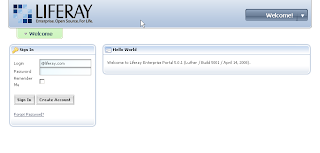
Liferay 5.0.1 Up and Running
Yesterday I attended the Liferay Intalio - Join Event, at Hilton Orchard Hotel Singapore.
The presentation itself was very short, but the cocktail is surprisingly quite long. I met great people here.
I believe Liferay is the fastest growing community on open source portal, and has been picking up very well and gaining reputable recognition.
Intalio is also an open source product in a niche market which has gained reputable recognition it its own niche market.
Today I downloaded the latest Liferay 5.0.1 bundled with Tomcat 5.5 from this link:
http://downloads.sourceforge.net/lportal/liferay-portal-tomcat-5.5-5.0.1.zip
I personally still prefer to use the Tomcat 5.5 rather than Tomcat 6.0, not because I'm a slow adapter of this latest app server, but because I found it quite problematic to deploy on Tomcat 6.0. This happens when I was working with a Struts application at my work. Something strange things happened, and Tomcat 6.0 does not show anything. After hours of finding out, I decided to give a try to deploy on Tomcat 5.5, which gave a thorough error message about deployment. It might be because of something the way Tomcat changes the logger between 5.5 and 6.0 which I haven't had time to explore much.
As expected the downloaded bundle works very well with my laptop environment.
I used JDK 5 to run it.
These are the steps needed to make the Liferay 5.0.1 running on my machine:
The presentation itself was very short, but the cocktail is surprisingly quite long. I met great people here.
I believe Liferay is the fastest growing community on open source portal, and has been picking up very well and gaining reputable recognition.
Intalio is also an open source product in a niche market which has gained reputable recognition it its own niche market.
Today I downloaded the latest Liferay 5.0.1 bundled with Tomcat 5.5 from this link:
http://downloads.sourceforge.net/lportal/liferay-portal-tomcat-5.5-5.0.1.zip
I personally still prefer to use the Tomcat 5.5 rather than Tomcat 6.0, not because I'm a slow adapter of this latest app server, but because I found it quite problematic to deploy on Tomcat 6.0. This happens when I was working with a Struts application at my work. Something strange things happened, and Tomcat 6.0 does not show anything. After hours of finding out, I decided to give a try to deploy on Tomcat 5.5, which gave a thorough error message about deployment. It might be because of something the way Tomcat changes the logger between 5.5 and 6.0 which I haven't had time to explore much.
As expected the downloaded bundle works very well with my laptop environment.
I used JDK 5 to run it.
These are the steps needed to make the Liferay 5.0.1 running on my machine:
- Extract the file to a folder (mine is [d:\opt\liferay-portal-tomcat-5.5-5.0.1])
- Set environment variable CATALINA_HOME to point to [d:\opt\liferay-portal-tomcat-5.5-5.0.1]
- Set your CLASSPATH, JAVA_HOME and PATH environment variables
- Run Tomcat 5.5 from the command line using "d:\opt\liferay-tomcat-5.5-5.0.1\bin\startup.bat"
- Watch the messages
- Test if it works by opening through your browser this url: http://localhost:8080/

Tuesday, January 23, 2007
Good repository of JDK documentation
I always liked the way Allimant collecting the JDK documentation, in a .chm file! It saves me a lot of time browsing the JavaDoc in its standard format, or browsing and searching in the Internet. The pre-indexed .chm file makes me find anything I need much faster.
http://www.allimant.org/javadoc/
Thursday, September 14, 2006
Installation of JBoss: A Trivial 4 Step Task
It really is a "4 step task":
1. Download
2. Unzip it!
3. Setup the JDK environment, if you haven't yet
4. Run the script
It works!
I have to admit that this is, the simplest application server that runs it the first time I installed, whether I'm running it in the Windows environment, Linux or Solaris boxes.
1. Download
Go to http://prdownloads.sourceforge.net/jboss/jboss-4.0.4.GA.zip?download
Choose your favorite sourceforge download site. I recommend download the zip version, as it is simpler to handle in multiplatform environment (my personal opinion).
Warning: 75,587kb download!
2. Unzip It!
Assuming that you are running a Windows environment, it is quite trivial task to install JBoss Application Server.
Run your favorite compression tools, unzip the jboss-4.0.4.GA.zip into your folder application server, e.g. c:\opt\env\jboss-4.0.4.GA
Then check that you have these foldere under you "c:\opt\jboss-4.0.4.GA" folder:
Also there exist some files (copyright.txt), jar-version.xml, lgpl.html, readme.html, readme_j2ee.html).
If you find these folders, everything seems to be ok this far.
3. Setup the JDK environment
This steps is required when you haven't done it yet. It is kind of setting the JAVA_HOME, CLASSPATH environment variables etc.
I would suggest to put it into a batch file or shell script for easier reuse. In my Windows environment, I would make c:\opt\env\set5.bat for setting up JDK 5, and c:\opt\env\set4.bat for setting up JDK 1.4.2.
The file set5.bat should contain at least:
set JAVA_HOME=c:\opt\env\jdk1.5.0_07
set JBOSS_HOME=c:\opt\env\jboss-4.0.4.GA
set CLASSPATH=%JAVA_HOME%\lib;%JAVA_HOME%\jre\lib;%JAVA_HOME%\jre\lib\ext;.
set PATH=%JAVA_HOME%\bin;%PATH%
Of course you have to tailor it to suit your environment settings.
4. Run the script
Run your script, open the command prompt and type this:
c:\>%JBOSS_HOME%\bin\run
If your command line shows message like these, than congratulations! You have successfully installed the JBoss Application Server. If this is your first time installing an Java application server, welcome to the new world of Java Enterprise Edition environment!
===============================================================================
.
JBoss Bootstrap Environment
.
JBOSS_HOME: c:\opt\env\jboss-4.0.4.GA\bin\\..
.
JAVA: c:\opt\env\jdk1.5.0_07\bin\java
.
JAVA_OPTS: -Dprogram.name=run.bat -Xms128m -Xmx512m -Dsun.rmi.dgc.client.gcInterval=3600000 -Dsun.rmi.dgc.server.gcIn
terval=3600000
.
CLASSPATH: c:\opt\env\jdk1.5.0_07\lib\tools.jar;d:\opt\env\jboss-4.0.4.GA\bin\\run.jar
.
===============================================================================
.
21:37:13,093 INFO [Server] Starting JBoss (MX MicroKernel)...
21:37:13,125 INFO [Server] Release ID: JBoss [Zion] 4.0.4.GA (build: CVSTag=JBoss_4_0_4_GA date=200605151000)
21:37:13,171 INFO [Server] Home Dir: c:\opt\env\jboss-4.0.4.GA
21:37:13,171 INFO [Server] Home URL: file:/c:/opt/env/jboss-4.0.4.GA/
21:37:13,171 INFO [Server] Patch URL: null
21:37:13,171 INFO [Server] Server Name: default
21:37:13,171 INFO [Server] Server Home Dir: D:\opt\env\jboss-4.0.4.GA\server\default
21:37:13,171 INFO [Server] Server Home URL: file:/D:/opt/env/jboss-4.0.4.GA/server/default/
21:37:13,171 INFO [Server] Server Log Dir: D:\opt\env\jboss-4.0.4.GA\server\default\log
21:37:13,171 INFO [Server] Server Temp Dir: D:\opt\env\jboss-4.0.4.GA\server\default\tmp
21:37:13,171 INFO [Server] Root Deployment Filename: jboss-service.xml
21:37:15,453 INFO [ServerInfo] Java version: 1.5.0_07,Sun Microsystems Inc.
21:37:15,453 INFO [ServerInfo] Java VM: Java HotSpot(TM) Client VM 1.5.0_07-b03,Sun Microsystems Inc.
21:37:15,453 INFO [ServerInfo] OS-System: Windows XP 5.1,x86
21:37:17,062 INFO [Server] Core system initialized
21:37:29,828 INFO [WebService] Using RMI server codebase: http://daniel:8083/
21:37:29,843 INFO [Log4jService$URLWatchTimerTask] Configuring from URL: resource:log4j.xml
21:37:32,031 INFO [NamingService] JNDI bootstrap JNP=/0.0.0.0:1099, RMI=/0.0.0.0:1098, backlog=50, no client SocketFact
ory, Server SocketFactory=class org.jboss.net.sockets.DefaultSocketFactory
21:37:47,703 INFO [Embedded] Catalina naming disabled
21:37:47,750 INFO [ClusterRuleSetFactory] Unable to find a cluster rule set in the classpath. Will load the default rul
e set.
21:37:47,765 INFO [ClusterRuleSetFactory] Unable to find a cluster rule set in the classpath. Will load the default rul
e set.
21:37:49,687 INFO [Http11BaseProtocol] Initializing Coyote HTTP/1.1 on http-0.0.0.0-8080
21:37:49,687 INFO [Catalina] Initialization processed in 1922 ms
21:37:49,687 INFO [StandardService] Starting service jboss.web
21:37:49,703 INFO [StandardEngine] Starting Servlet Engine: Apache Tomcat/5.5.17
21:37:49,734 INFO [StandardHost] XML validation disabled
21:37:49,765 INFO [Catalina] Server startup in 78 ms
21:37:50,750 INFO [TomcatDeployer] deploy, ctxPath=/invoker, warUrl=.../deploy/http-invoker.sar/invoker.war/
21:37:51,828 INFO [WebappLoader] Dual registration of jndi stream handler: factory already defined
21:37:58,656 INFO [TomcatDeployer] deploy, ctxPath=/, warUrl=.../deploy/jbossweb-tomcat55.sar/ROOT.war/
21:38:02,500 INFO [TomcatDeployer] deploy, ctxPath=/jbossws, warUrl=.../tmp/deploy/tmp9122jbossws-exp.war/
21:38:02,875 INFO [SubscriptionManager] Bound event dispatcher to java:/EventDispatcher
21:38:03,937 INFO [TomcatDeployer] deploy, ctxPath=/jbossmq-httpil, warUrl=.../deploy/jms/jbossmq-httpil.sar/jbossmq-ht
tpil.war/
21:38:11,000 INFO [TomcatDeployer] deploy, ctxPath=/web-console, warUrl=.../deploy/management/console-mgr.sar/web-conso
le.war/
21:38:14,875 INFO [MailService] Mail Service bound to java:/Mail
21:38:15,625 INFO [RARDeployment] Required license terms exist, view META-INF/ra.xml in .../deploy/jboss-ha-local-jdbc.
rar
21:38:15,687 INFO [RARDeployment] Required license terms exist, view META-INF/ra.xml in .../deploy/jboss-ha-xa-jdbc.rar
21:38:15,781 INFO [RARDeployment] Required license terms exist, view META-INF/ra.xml in .../deploy/jboss-local-jdbc.rar
21:38:15,843 INFO [RARDeployment] Required license terms exist, view META-INF/ra.xml in .../deploy/jboss-xa-jdbc.rar
21:38:16,015 INFO [RARDeployment] Required license terms exist, view META-INF/ra.xml in .../deploy/jms/jms-ra.rar
21:38:16,093 INFO [RARDeployment] Required license terms exist, view META-INF/ra.xml in .../deploy/mail-ra.rar
21:38:19,562 INFO [ConnectionFactoryBindingService] Bound ConnectionManager 'jboss.jca:service=DataSourceBinding,name=D
efaultDS' to JNDI name 'java:DefaultDS'
21:38:20,109 INFO [A] Bound to JNDI name: queue/A
21:38:20,109 INFO [B] Bound to JNDI name: queue/B
21:38:20,109 INFO [C] Bound to JNDI name: queue/C
21:38:20,109 INFO [D] Bound to JNDI name: queue/D
21:38:20,125 INFO [ex] Bound to JNDI name: queue/ex
21:38:20,140 INFO [testTopic] Bound to JNDI name: topic/testTopic
21:38:20,140 INFO [securedTopic] Bound to JNDI name: topic/securedTopic
21:38:20,140 INFO [testDurableTopic] Bound to JNDI name: topic/testDurableTopic
21:38:20,140 INFO [testQueue] Bound to JNDI name: queue/testQueue
21:38:20,531 INFO [UILServerILService] JBossMQ UIL service available at : /0.0.0.0:8093
21:38:20,562 INFO [DLQ] Bound to JNDI name: queue/DLQ
21:38:20,781 INFO [ConnectionFactoryBindingService] Bound ConnectionManager 'jboss.jca:service=ConnectionFactoryBinding
,name=JmsXA' to JNDI name 'java:JmsXA'
21:38:20,984 INFO [TomcatDeployer] deploy, ctxPath=/jmx-console, warUrl=.../deploy/jmx-console.war/
21:38:21,515 INFO [Http11BaseProtocol] Starting Coyote HTTP/1.1 on http-0.0.0.0-8080
21:38:22,000 INFO [ChannelSocket] JK: ajp13 listening on /0.0.0.0:8009
21:38:22,015 INFO [JkMain] Jk running ID=0 time=0/62 config=null
21:38:22,031 INFO [Server] JBoss (MX MicroKernel) [4.0.4.GA (build: CVSTag=JBoss_4_0_4_GA date=200605151000)] Started i
n 1m:8s:860ms
1. Download
2. Unzip it!
3. Setup the JDK environment, if you haven't yet
4. Run the script
It works!
I have to admit that this is, the simplest application server that runs it the first time I installed, whether I'm running it in the Windows environment, Linux or Solaris boxes.
1. Download
Go to http://prdownloads.sourceforge.net/jboss/jboss-4.0.4.GA.zip?download
Choose your favorite sourceforge download site. I recommend download the zip version, as it is simpler to handle in multiplatform environment (my personal opinion).
Warning: 75,587kb download!
2. Unzip It!
Assuming that you are running a Windows environment, it is quite trivial task to install JBoss Application Server.
Run your favorite compression tools, unzip the jboss-4.0.4.GA.zip into your folder application server, e.g. c:\opt\env\jboss-4.0.4.GA
Then check that you have these foldere under you "c:\opt\jboss-4.0.4.GA" folder:
- bin
- client
- docs
- lib
- server
Also there exist some files (copyright.txt), jar-version.xml, lgpl.html, readme.html, readme_j2ee.html).
If you find these folders, everything seems to be ok this far.
3. Setup the JDK environment
This steps is required when you haven't done it yet. It is kind of setting the JAVA_HOME, CLASSPATH environment variables etc.
I would suggest to put it into a batch file or shell script for easier reuse. In my Windows environment, I would make c:\opt\env\set5.bat for setting up JDK 5, and c:\opt\env\set4.bat for setting up JDK 1.4.2.
The file set5.bat should contain at least:
set JAVA_HOME=c:\opt\env\jdk1.5.0_07
set JBOSS_HOME=c:\opt\env\jboss-4.0.4.GA
set CLASSPATH=%JAVA_HOME%\lib;%JAVA_HOME%\jre\lib;%JAVA_HOME%\jre\lib\ext;.
set PATH=%JAVA_HOME%\bin;%PATH%
Of course you have to tailor it to suit your environment settings.
4. Run the script
Run your script, open the command prompt and type this:
c:\>%JBOSS_HOME%\bin\run
If your command line shows message like these, than congratulations! You have successfully installed the JBoss Application Server. If this is your first time installing an Java application server, welcome to the new world of Java Enterprise Edition environment!
===============================================================================
.
JBoss Bootstrap Environment
.
JBOSS_HOME: c:\opt\env\jboss-4.0.4.GA\bin\\..
.
JAVA: c:\opt\env\jdk1.5.0_07\bin\java
.
JAVA_OPTS: -Dprogram.name=run.bat -Xms128m -Xmx512m -Dsun.rmi.dgc.client.gcInterval=3600000 -Dsun.rmi.dgc.server.gcIn
terval=3600000
.
CLASSPATH: c:\opt\env\jdk1.5.0_07\lib\tools.jar;d:\opt\env\jboss-4.0.4.GA\bin\\run.jar
.
===============================================================================
.
21:37:13,093 INFO [Server] Starting JBoss (MX MicroKernel)...
21:37:13,125 INFO [Server] Release ID: JBoss [Zion] 4.0.4.GA (build: CVSTag=JBoss_4_0_4_GA date=200605151000)
21:37:13,171 INFO [Server] Home Dir: c:\opt\env\jboss-4.0.4.GA
21:37:13,171 INFO [Server] Home URL: file:/c:/opt/env/jboss-4.0.4.GA/
21:37:13,171 INFO [Server] Patch URL: null
21:37:13,171 INFO [Server] Server Name: default
21:37:13,171 INFO [Server] Server Home Dir: D:\opt\env\jboss-4.0.4.GA\server\default
21:37:13,171 INFO [Server] Server Home URL: file:/D:/opt/env/jboss-4.0.4.GA/server/default/
21:37:13,171 INFO [Server] Server Log Dir: D:\opt\env\jboss-4.0.4.GA\server\default\log
21:37:13,171 INFO [Server] Server Temp Dir: D:\opt\env\jboss-4.0.4.GA\server\default\tmp
21:37:13,171 INFO [Server] Root Deployment Filename: jboss-service.xml
21:37:15,453 INFO [ServerInfo] Java version: 1.5.0_07,Sun Microsystems Inc.
21:37:15,453 INFO [ServerInfo] Java VM: Java HotSpot(TM) Client VM 1.5.0_07-b03,Sun Microsystems Inc.
21:37:15,453 INFO [ServerInfo] OS-System: Windows XP 5.1,x86
21:37:17,062 INFO [Server] Core system initialized
21:37:29,828 INFO [WebService] Using RMI server codebase: http://daniel:8083/
21:37:29,843 INFO [Log4jService$URLWatchTimerTask] Configuring from URL: resource:log4j.xml
21:37:32,031 INFO [NamingService] JNDI bootstrap JNP=/0.0.0.0:1099, RMI=/0.0.0.0:1098, backlog=50, no client SocketFact
ory, Server SocketFactory=class org.jboss.net.sockets.DefaultSocketFactory
21:37:47,703 INFO [Embedded] Catalina naming disabled
21:37:47,750 INFO [ClusterRuleSetFactory] Unable to find a cluster rule set in the classpath. Will load the default rul
e set.
21:37:47,765 INFO [ClusterRuleSetFactory] Unable to find a cluster rule set in the classpath. Will load the default rul
e set.
21:37:49,687 INFO [Http11BaseProtocol] Initializing Coyote HTTP/1.1 on http-0.0.0.0-8080
21:37:49,687 INFO [Catalina] Initialization processed in 1922 ms
21:37:49,687 INFO [StandardService] Starting service jboss.web
21:37:49,703 INFO [StandardEngine] Starting Servlet Engine: Apache Tomcat/5.5.17
21:37:49,734 INFO [StandardHost] XML validation disabled
21:37:49,765 INFO [Catalina] Server startup in 78 ms
21:37:50,750 INFO [TomcatDeployer] deploy, ctxPath=/invoker, warUrl=.../deploy/http-invoker.sar/invoker.war/
21:37:51,828 INFO [WebappLoader] Dual registration of jndi stream handler: factory already defined
21:37:58,656 INFO [TomcatDeployer] deploy, ctxPath=/, warUrl=.../deploy/jbossweb-tomcat55.sar/ROOT.war/
21:38:02,500 INFO [TomcatDeployer] deploy, ctxPath=/jbossws, warUrl=.../tmp/deploy/tmp9122jbossws-exp.war/
21:38:02,875 INFO [SubscriptionManager] Bound event dispatcher to java:/EventDispatcher
21:38:03,937 INFO [TomcatDeployer] deploy, ctxPath=/jbossmq-httpil, warUrl=.../deploy/jms/jbossmq-httpil.sar/jbossmq-ht
tpil.war/
21:38:11,000 INFO [TomcatDeployer] deploy, ctxPath=/web-console, warUrl=.../deploy/management/console-mgr.sar/web-conso
le.war/
21:38:14,875 INFO [MailService] Mail Service bound to java:/Mail
21:38:15,625 INFO [RARDeployment] Required license terms exist, view META-INF/ra.xml in .../deploy/jboss-ha-local-jdbc.
rar
21:38:15,687 INFO [RARDeployment] Required license terms exist, view META-INF/ra.xml in .../deploy/jboss-ha-xa-jdbc.rar
21:38:15,781 INFO [RARDeployment] Required license terms exist, view META-INF/ra.xml in .../deploy/jboss-local-jdbc.rar
21:38:15,843 INFO [RARDeployment] Required license terms exist, view META-INF/ra.xml in .../deploy/jboss-xa-jdbc.rar
21:38:16,015 INFO [RARDeployment] Required license terms exist, view META-INF/ra.xml in .../deploy/jms/jms-ra.rar
21:38:16,093 INFO [RARDeployment] Required license terms exist, view META-INF/ra.xml in .../deploy/mail-ra.rar
21:38:19,562 INFO [ConnectionFactoryBindingService] Bound ConnectionManager 'jboss.jca:service=DataSourceBinding,name=D
efaultDS' to JNDI name 'java:DefaultDS'
21:38:20,109 INFO [A] Bound to JNDI name: queue/A
21:38:20,109 INFO [B] Bound to JNDI name: queue/B
21:38:20,109 INFO [C] Bound to JNDI name: queue/C
21:38:20,109 INFO [D] Bound to JNDI name: queue/D
21:38:20,125 INFO [ex] Bound to JNDI name: queue/ex
21:38:20,140 INFO [testTopic] Bound to JNDI name: topic/testTopic
21:38:20,140 INFO [securedTopic] Bound to JNDI name: topic/securedTopic
21:38:20,140 INFO [testDurableTopic] Bound to JNDI name: topic/testDurableTopic
21:38:20,140 INFO [testQueue] Bound to JNDI name: queue/testQueue
21:38:20,531 INFO [UILServerILService] JBossMQ UIL service available at : /0.0.0.0:8093
21:38:20,562 INFO [DLQ] Bound to JNDI name: queue/DLQ
21:38:20,781 INFO [ConnectionFactoryBindingService] Bound ConnectionManager 'jboss.jca:service=ConnectionFactoryBinding
,name=JmsXA' to JNDI name 'java:JmsXA'
21:38:20,984 INFO [TomcatDeployer] deploy, ctxPath=/jmx-console, warUrl=.../deploy/jmx-console.war/
21:38:21,515 INFO [Http11BaseProtocol] Starting Coyote HTTP/1.1 on http-0.0.0.0-8080
21:38:22,000 INFO [ChannelSocket] JK: ajp13 listening on /0.0.0.0:8009
21:38:22,015 INFO [JkMain] Jk running ID=0 time=0/62 config=null
21:38:22,031 INFO [Server] JBoss (MX MicroKernel) [4.0.4.GA (build: CVSTag=JBoss_4_0_4_GA date=200605151000)] Started i
n 1m:8s:860ms
Subscribe to:
Posts (Atom)